Spark
Powered by AI

LPG Distribution, Simplified

Orders, cylinders, trips, payments, and restaurant accounts connected from booking to delivery.

Free to start · No payment required · Web + Android

Before / After

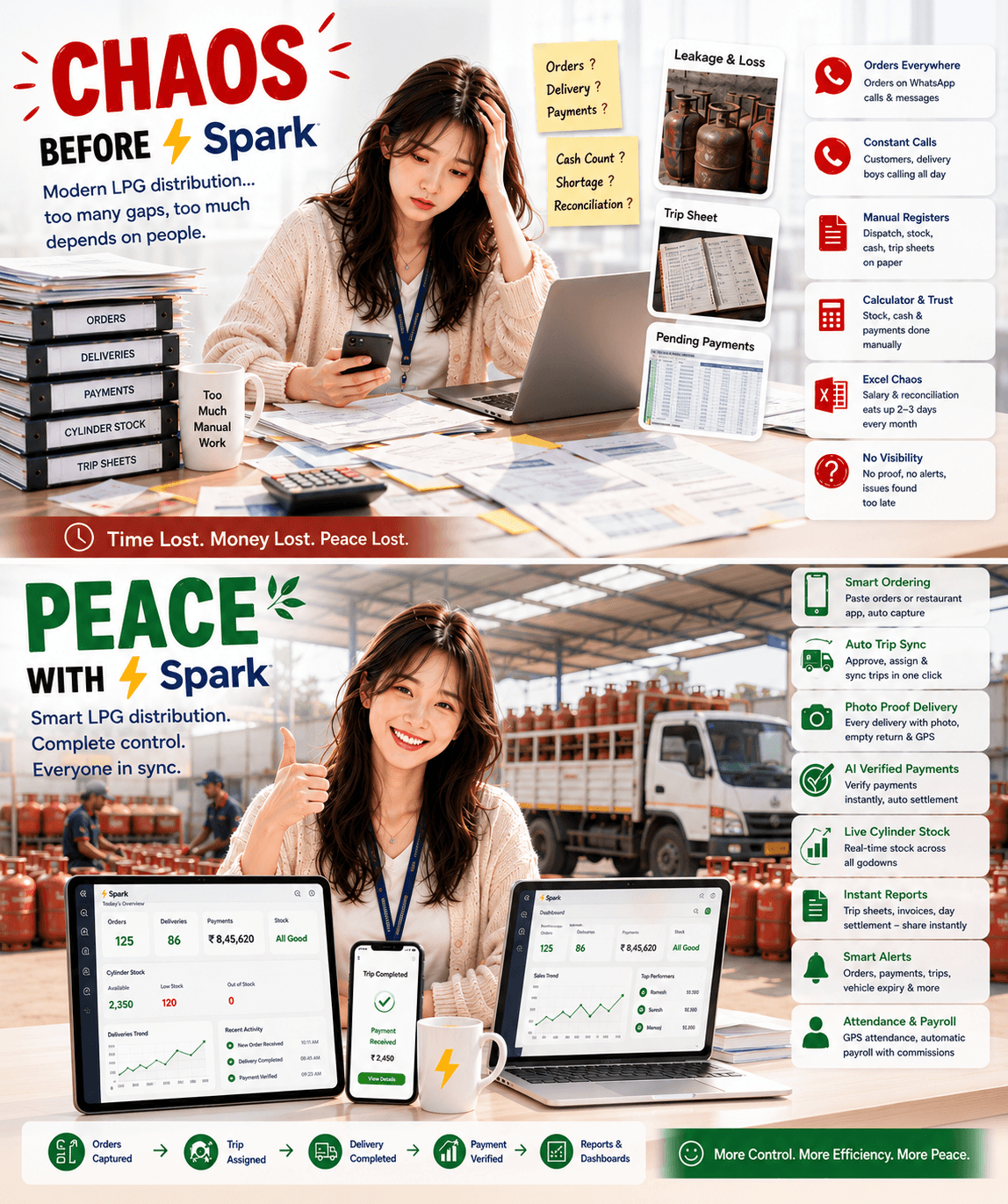
From manual mayhem to smart control

Paper registers, WhatsApp orders, and month-end Excel on one side. Live trips, AI payments, and a dashboard that already knows the day on the other.

Chaos before Spark: paper dispatch, stock and cash registers, WhatsApp orders, and handwritten trip sheets. Peace with Spark: restaurant orders, trip planning, photo-proof delivery, AI payments, live stock, and automated payroll.

The complete LPG system

One order record.
Every cylinder accounted for.

From a pasted WhatsApp order list to collections applied to credit sales, a settled day, and a payroll month built from GPS attendance.

01 / FeatureSales · Domestic

The household round, on the record.

Domestic cylinders, NFR items, connections, and vouchers are entered once and feed the summary, the stock report, and staff commission.

14.2 · 10 · 5 kg

Daily Cylinder Sales

Record domestic sales staff-wise with a cash, digital, or prepaid split. Amounts compute from product prices, and each day collapses into its own row.

Non-fuel revenue

NFR Products

Regulators, stoves, Suraksha hose, lighters, and trolleys tracked per product per day, with quantity and a cash or digital breakdown.

DBC · TV · Surrender

Connections & Vouchers

New connections, double bottle connections, TV In/Out, and surrenders logged with staff, cylinder type, and accessories, then posted to the stock report.

Day view

Sales & Payment Summary

A day-by-day summary of domestic, NFR, and connection activity beside the money collected, with one-click verification once a day is checked.

Feeds payroll

Domestic Commission

Per-staff commission rates on domestic cylinders are applied inside the payroll run, on top of base salary, instead of a separate sheet.
02 / FeatureSales · Commercial

Restaurants, with credit in view.

Commercial outlets get their own register, their own discounts, and a live credit position on the order screen before the cylinders ever leave the godown.

19 · 47.5 kg

Commercial Restaurants

Per-restaurant tracking for commercial cylinders with store-specific discounts and the delivery staff credited on every sale.

Advisory banner

Live Credit Position

Add Order and Approve Order show outstanding against the restaurant's limit and turn red when it is crossed, plus outstanding and credit-limit alerts. The office still decides.

8 modes

Every Payment Rail

Cash, UPI, IMPS, NEFT, RTGS, cheque, card, and prepaid can settle a commercial sale, each captured with its proof image.

One tap

WhatsApp Invoices

Send the sale invoice or the restaurant's ledger to their WhatsApp from the sale itself. No printing, no PDF hunting.

Own tab

Separate From Domestic

Commercial credit sales sit in their own tab beside domestic, so a restaurant round and a household round never share a register.

03 / FeatureOrders

A WhatsApp list becomes real orders.

Order intake takes single entries, a pasted bulk list, or a recurring schedule, and resolves every line to the right restaurant before anything is created.

Mobile or web

Single Order Entry

Field staff raise one order at a time, with restaurants ranked as they type so the right outlet is picked in a couple of taps.

Bulk intake

WhatsApp Order Paste

Paste the day's WhatsApp list and each line becomes an order. Fuzzy matching resolves typos and partial names to the right restaurant.

Match scores

Fix Before You Commit

A preview shows every parsed row with its match score, so ambiguous restaurants are corrected before a single order is created.

Today & yesterday

Duplicate Warnings

A second order for the same restaurant today or yesterday is flagged, with the option to move a pending approved batch to today instead.

Recurring

Scheduled Orders

Restaurants that order on a rhythm are set up once, and their orders are raised automatically on the day they are due.

Protected reversal

Approve, Assign, Lock

Approve in bulk, assign delivery staff, and move orders to Verified. Pushing a status backward needs a protected action password.

04 / FeatureTrips & Delivery

Approved orders become a driver's day.

Trips build themselves from approved orders, carry live full and empty counts, and close with photo and GPS proof at every restaurant.

Auto-synced

Trips From Approved Orders

Approve and sync: the day's approved orders become one trip per delivery staff member, or get appended to a trip that is already out on the road.

Per trip

Driver, Vehicle & Odometer

The office assigns delivery staff on web. The driver picks one of their assigned vehicles in the app, and opening and closing KM give the trip its distance.

Google Maps

Sequenced Route & Maps

Stops are ordered by distance from the starting point, previewed on a map with numbered pins, and opened in Google Maps. Recurring runs clone in one action.

Per stop

Full & Empty Trackers

Full loaded, full delivered, and empties collected update as the trip runs, broken down per product at every stop, with damaged and leakage at the close.

Photo · GPS

Delivery Proof

Drivers log a photo, GPS, and empties returned at each restaurant, with an optional check-in at the outlet, and the delivered card shows who ran the stop.

Text · PDF

Trip Report On WhatsApp

Send the trip report as a message and the full trip sheet as a PDF to a driver, a restaurant contact, or the office group, straight from the trip row.

3 moments

Trip Events, Announced

Trip started with vehicle and opening KM, each stop completed with what was dropped, and trip completed with closing KM and distance, on WhatsApp and in-app.

Manager app

Restaurant Sees The Run

The restaurant's own Delivery tab shows the assigned driver, a call button, stops completed, how many stops away the van is, and the delivery photo afterwards.

05 / FeatureVehicles

The fleet, its papers, and its dates.

Every truck and bike lives on web with its documents and compliance dates, and the reminder arrives before the fine does rather than after it.

Trucks · bikes

Web Vehicle Register

Registration, type, make and model, chassis and engine numbers, odometer, status, and the delivery staff assigned to each vehicle, searchable and filterable on web.

6 document types

Papers On File

RC, insurance, fitness, road tax, PUC, and permit stored against the vehicle as images or PDFs, each with its own number, issue date, and expiry date.

Daily digest

Expiry & Service Reminders

One daily digest of everything expiring within 30 days or already overdue, on WhatsApp and in-app, routed to the office or the driver assigned that vehicle.

Trip start

Checked Before It Rolls

Starting a trip in the app means picking an assigned vehicle, confirming the odometer, and ticking a six-point safety check including fire extinguisher and PPE.

06 / FeatureStock

Cylinders counted by the system.

The stock report builds from sales already entered, so the difference between computed and physical shows up while you can still act on it.

4 categories

Auto-Populated Stock Report

Sent/Sold, New Connection, TV In, and Surrender rows are computed from the sales already entered, not typed a second time.

One view

Opening & Closing Per Day

Day-by-day opening and closing balances for Domestic, Commercial, NFR, and Connection categories on a single screen.

Same day

Computed vs Physical

The gap between computed stock and the physical count shows up the same day, instead of surfacing during month-end closing.

4 tabs

Stock Workspace

Cylinders, NFR items, and products organised by tab, including what is currently loaded on each delivery vehicle.

Per restaurant · PDF

Cylinder Stock Ledger

Filled cylinders out, empties back, and the balance held per outlet, exportable as a single-restaurant or consolidated PDF, once stock ledger tracking is switched on.

07 / FeaturePayments

Collections tied to the sales they clear.

Bank and PayTM files still auto-match settlements, while Spark links collections to restaurant sales invoices and surfaces unlinked payments on Collection and Settlement.

Hundreds at once

Bank Statement Auto-Settlement

Drop one ICICI or SBI statement and hundreds of small credits match against recorded payments by UTR, cheque number, store name, and amount in a single pass.

Terminal · shift

PayTM POS Batches

Card and QR collections settle as shift batches matched on terminal, shift window, summed amount, and success counts, instead of one screenshot at a time.

Settled together

Restaurant Payments Matched

Credit customer credits on the statement are matched to the restaurant that paid and settled together, turning an afternoon of ledger hunting into minutes.

Receipt attached

Every Rail, With Proof

Cheque, cash, IMPS, NEFT, RTGS, UPI, card, and prepaid collections, each stored with the receipt image behind it.

Collection · Settlement

Payments Linked to Sales

Apply each collection to the delivered credit sale or invoice it pays. Collection and Settlement tabs warn when a payment is not linked to a sales invoice.

Review · bulk apply

Payment Application Queue

Spark scores open sales by amount, store, and references, queues high-confidence matches for bulk apply, and sends the rest to a review list.

WhatsApp send

Day Settlement PDF

Expandable day rows for sales collections, payment collections, expenses, and in-hand cash per type, sent to WhatsApp as a PDF from the screen.

CSV or PDF

Office Cash Register

Collections, transfers, and expenses reconcile to one closing balance. Export the register as CSV on web, or share the cash report PDF from the Android app.

08 / FeatureAI

AI reads the receipt before you trust it.

The same verification runs across cheques, digital receipts, expense bills, and attendance selfies, and corrects the record from what it actually read.

Payments

Cheque Checks

Amount tampering, words against digits, payee name, cheque number, expired or cancelled cheques, and missing signatures.

Payments

Digital Receipt Checks

Amount, date, UTR, and transfer type read straight off UPI, IMPS, NEFT, and RTGS screenshots, with the status confirmed as successful rather than pending or failed.

Fraud

Fake Or Edited Images

Fabricated receipts, edited cheque photos, and screenshots that were never a payment at all are flagged instead of being filed as proof.

Payments

Misrouted Money

The credited-to account is matched against your bank account, UPI ID, and PayTM merchant ID, so money paid elsewhere is caught the same day.

Everywhere

One-Click Correction

When AI and the entry disagree, apply the AI-extracted value to the record in one click instead of retyping the field.

5 images

Add Payment With AI

Drop up to five receipts on web. Amount, date, UTR, type, and mode are extracted and the entries are created prefilled for review.

Expenses

Expense Receipts

A bill dropped into the AI tab on Expenses arrives with amount, date, category, and description already filled in.

Staff

Face ID Attendance

Check-in selfies are matched against registered faces with optional liveness checks, so attendance is not a shared phone.

09 / FeatureExpenses

Every rupee out, categorised.

Agency and staff spend captured with receipts, imported from the bank when it is easier, and carried into payroll and the day's cash position.

40+ heads

Categories That Fit LPG

Rent, salary, advance, diesel, bank interest, TV Out, and surrender among them. TV Out and surrender also capture cylinder and regulator counts.

Attributed

Staff or Company

Tag spend to the agency or to a person. Staff rows carry the employee, so payroll can net them against that month's pay.

Photo attached

Receipt On The Entry

Attach the bill photo to the expense itself, so the entry carries its own proof instead of a receipt sitting loose in a drawer.

Duplicate-safe

Bank Statement Import

Import a statement and turn debit rows into expenses, with already-imported transactions detected instead of double counted.

CSV

Day, List & Export

Switch between a day view with daily totals and a flat sortable list, then export the period to CSV for your accountant.

10 / FeatureRestaurants & Ledger

Know the outlet before you extend credit.

One restaurant record holds documents, credit position, visits, and promotions, so the ledger and the field team work from the same page.

Shared record

Restaurant Master

Every commercial outlet with its contacts, discounts, and assigned staff, used by orders, sales, payments, and trips alike.

Section by section

Verified KYC On File

GSTIN, ownership documents, store front photo, and security cheque tracked to completion, with a verified badge on the list.

Running balance

Payment Ledger

Opening balance, every sale and payment, and a running outstanding per restaurant, exported as PDF, CSV, or Excel and sent to their WhatsApp from the same screen.

On a schedule

Outstanding Reminders

Outstanding balance and credit-limit alerts run on their own timing to the office, the GM, or the restaurant itself, so recovery doesn't wait for somebody to remember.

Selfie · geofence

GPS Check-Ins

Field visits are backed by GPS and a selfie inside a radius you set, with automatic check-out when someone leaves and doesn't return, and full visit history per outlet.

Office publishes

Promotions

The office writes an offer as text, an image, or both, and starts or stops it. Restaurant managers get a homepage popup and a Promotions screen in the app.

11 / FeatureStaff & Payroll

Attendance that turns into salary.

Face ID or GPS attendance, leave approvals, commission, and deductions land in one payroll run with a payslip on WhatsApp at the end of it.

Month grid

Attendance Register

Present, absent, late, Sunday, and holiday per employee per day, with bulk marking and an absent-staff summary.

Two ways in

Face ID or GPS

Staff mark attendance with face recognition at a tablet, or a GPS check-in with selfie from the Android app.

Synced to pay

Leave & Time Off

Requests come from the app and are approved on web. Approved leave lands in attendance so payroll counts the right days.

One run

Payroll With Commission

Base salary from attendance plus domestic cylinder commission at per-staff rates, calculated together rather than in two passes.

Traceable

Deductions That Link Back

Advances, staff expenses, and late penalties pull in automatically, each still pointing at the date and transaction behind it.

PDF

Payslip On WhatsApp

Generate the payslip PDF for each employee and send it to them on WhatsApp from the payroll screen.

12 / FeatureTasks

Back-office work, assigned and tracked.

Projects hold the tasks, templates lay out the usual ones, and every task names an owner, a due date, a priority, and the outlet it belongs to.

One owner per task

Projects Hold The Tasks

Every task carries a title, a description, one assigned employee, a due date, a priority, and the store or location it belongs to when it has one.

Delivery audit

Templates Do The Setup

Built-in project templates write the task list for you, so a delivery audit or a restaurant onboarding starts fully laid out instead of blank.

5 steps

Pending To Closed

Pending, in progress, completed, verified, closed. Field staff can push a task as far as completed; verifying and closing stay with the office.

Photos optional

My Tasks On Android

Assigned staff open My Tasks in the app, move a task forward, and attach camera photos as proof. Creating and assigning tasks happens on web.

Overdue flagged

Counts And Progress

Pending, in progress, completed, verified, and overdue counts with a progress percentage per project. Overdue means past due and not yet verified or closed.

13 / FeatureInsights

Every part of the day, analysed.

Sales, orders, payments, expenses, and check-ins each get their own analysis view, built from what the field and the office already entered today.

Cylinders · NFR

Sales Insights

Daily cylinders and NFR items, connections and vouchers, filled against empty returned, location-wise sales, staff performance, and low stock alerts.

Flow · pace

Orders Insights

Order flow, approval performance, delivery pace, daily orders against delivered, product demand, staff and delivery league tables, and outlets that stopped ordering.

Recovery · credit

Payments Insights

Cash and credit recovery, collection mix by type, pending deposits, verification still owed, collections per staff member, and credit days across outlets.

Calendar · trend

Expenses Insights

Category breakdown, staff against company split, a month calendar of daily spend, and a daily trend through the month rather than one total at the end of it.

Coverage

Check-In Insights

Restaurant coverage overall and by staff, visit frequency bands, a top-10 leaderboard, the least visited outlets, a visits heatmap, and a daily visit trend.

14 / FeatureAlerts

Spark watches, and tells one person.

45+ alert types cover sales, orders, trips, deposits, credit, and paperwork, each routed to the group or person who can act, on WhatsApp and in the app.

Configurable

45+ Alert Types

Sales reminders, orders pending approval, trip completed, cheque deposit delays, credit limit breaches, leave requests, and vehicle documents about to expire.

Per alert

Routed To Whoever Acts

Each alert goes to the office group, the market group, the GM, or one named person, so it lands with somebody who can actually do something about it.

Both channels

WhatsApp And In-App

The same alert arrives on WhatsApp and as an in-app notification, so nobody has to be sitting in front of the dashboard for it to land.

Per-alert timing

Each One On A Schedule

Every alert carries its own schedule, so a daily sales reminder and a credit limit breach don't have to arrive on the same rhythm.

From the screen

Reports Out On WhatsApp

Day settlement PDFs, trip reports, invoices, and ledgers all send from the screen you are already working on.

15 / FeatureCustomization

Configured to how your agency runs.

No two gas agencies work the same way. Modules, manager access, check-in rules, analytics, alert routing, and branding are settings your administrator changes, not a rebuild.

Per company

Modules On Or Off

Orders, trips, vehicles, stock ledger, KYC, expenses, payroll, time off, and targets each switch on per company, so nobody stares at a screen their agency never uses.

Role-scoped

Restaurant Manager Access

Decide whether restaurant managers get a login at all, and which tabs open for them: orders, payments, their payment ledger, and their cylinder stock ledger.

GPS · photo

Check-In Rules Are Yours

GPS fencing on or off, a check-in radius between 5 and 100 metres, whether the check-in photo is required, and how long before an auto check-out fires.

Per view

Only The Insights You Read

Sales, orders, payments, expenses, and check-in analytics toggle independently, so the Insights menu carries the views your office actually reviews each week.

Your details

Alerts, Branding & Bank

Recipients and send time per alert, plus company logo, timezone, and bank details on invoices and reports. Every agency runs differently, so Spark is configured to match.

16 / FeatureManager App & Web

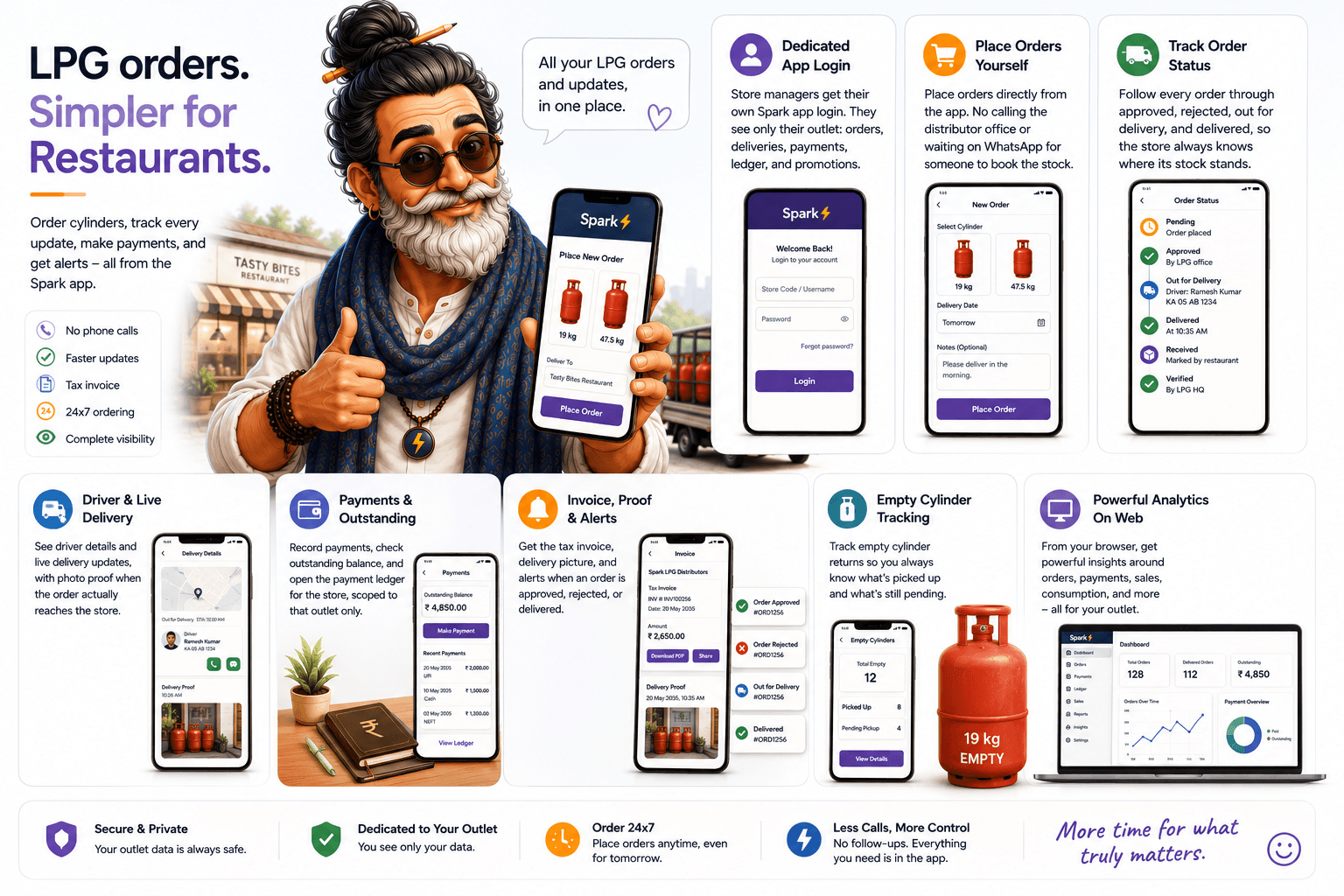
Restaurants order for themselves.

Each outlet gets a Spark login on Android and in the browser, scoped to its own orders, payments, and ledger.

Restaurant manager Spark app for LPG: dedicated outlet login, self-service cylinder ordering, live order status through delivery and verification, driver and delivery photo proof, payments and outstanding ledger, tax invoice and alerts, empty cylinder tracking, and web analytics for the outlet.
17 / FeatureNo Other Software

Six things nobody else in LPG does.

Where the rest of the category stops at data entry, these are the places Spark does the work and keeps the proof.

Nobody else

AI-Verified Payments

Every cheque and digital receipt is machine-checked for amount, date, UTR, payee, and credited-to account. Others trust what staff type in.

15 sec vs 15 min

Payments Created By AI

Bulk screenshots become reviewed payment entries in seconds. Zero LPG competitors offer this today.

File drop

Automated Bank Settlement

No other LPG product reconciles PayTM and bank statement files against recorded payments automatically.

From sales

A Stock Report That Fills Itself

Sales, connections, TV movements, and surrenders post themselves into the stock report instead of being re-keyed each day.

5 min

Payroll With Commission Built In

GPS attendance, advances, penalties, and domestic commission produce payslips in one run. No LPG software does this.

Rare

Connections & NFR Tracked

Connections, DBC, and TV transfers are tracked (only GASS comes close), and NFR product sales are tracked by no LPG competitor.

Restaurant Manager · Web Portal

Send your restaurant managers straight to the portal

Same employee credentials as the Android app, scoped to the outlets you assign. No separate product to buy or install.

FAQ

Run your gas agency on proof, not phone calls

Questions, a demo, or partnerships. Reach us on email or WhatsApp and a human replies.

Free to start · No payment required · Web + Android