Spark
Powered by AI

Mobile Distribution, Supercharged

Stock, store visits, orders, delivery, collections, and field performance in one connected workflow.

Free to start · No payment required · Web + Android

Before / After

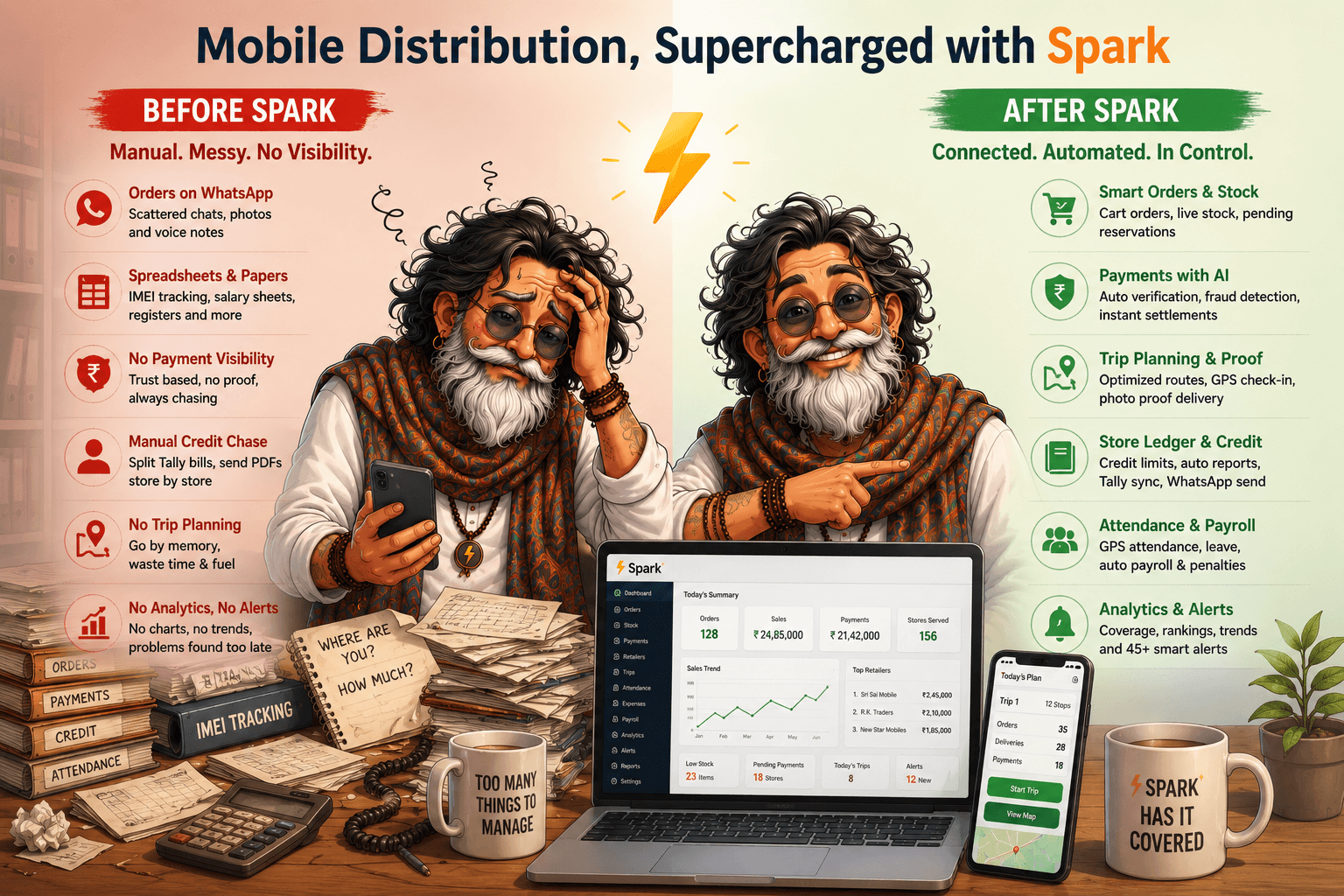
Mobile distribution, supercharged

WhatsApp orders, Tally PDFs, and a pile of spreadsheets on one side. Live stock, AI payments, planned trips, and a dashboard that already knows the day on the other.

Left: a distributor buried in WhatsApp orders, spreadsheets, Tally PDFs and paper registers. Right: the same owner with Spark, a live sales dashboard on a laptop and today's trip plan on a phone.

Every area of the app, end to end

One warehouse of truth.
Every retailer connected.

Walk the app the way your team works it: stock in, orders out, sales invoiced, payments applied to those sales, staff paid, and every report that follows.

01 / FeatureStock

Stock the field can trust.

Warehouse quantity imported from Tally, sale price changes tracked, and reserved stock visible on the Android home screen before anyone promises a retailer anything.

Tally import

Stock Import from Tally

Warehouse quantity comes from a Tally import. Pending orders reserve stock, so field staff only sell what is truly available.

Excel price import

Sale Price Import & History

Import dealer RP prices from Excel on web. Spark skips unchanged rows, keeps per-product history with a trend graph, and adds an All/Price Change filter on Stock.

Android home

Home Stock Card

GM, CEO, MIS, and TSE see company stock by category and SKU on the Android home screen. Tap a product for the pending and approved orders reserving it.

Web bulk edit

Bulk Inventory Edit

Fix color, category, manufacturer, and title case across many SKUs at once on web, instead of correcting products one at a time.

Scan · track · invoice

IMEI-Level Traceability

Scan IMEI numbers into inventory and carry them through to the invoice, so every handset stays traceable from warehouse to retailer.
02 / FeatureOrders

One order flow, three ways in.

Single cart orders in the shop, bulk paste from WhatsApp, or an import, then office approval, a status every side can read, and a credit limit watch on anyone overdue.

Live warehouse stock

Cart Orders on Live Stock

Executives browse your live catalog in the shop by manufacturer, category, and model, add items capped by available stock, and watch GST totals update as the cart builds.

Web + Android

Bulk Order Paste & Import

Paste dealer order text from WhatsApp. Spark matches retailers by name or code and resolves model, color, and capacity lines against live inventory before creating orders.

Office approval

Office Approval

Office approves orders on web before anything moves, then the trip planner sequences the delivery stops waiting for that day.

Pending to verified

Status All The Way To Verified

An order moves from pending to approved, out for delivery, delivered, and verified, and everyone from the office to the store manager reads the same stage.

Over-limit alert

Credit Limit Watch at Order Entry

Store credit limits are checked against outstanding, and an over-limit retailer is flagged and alerted at order entry so the office decides before stock moves.

03 / FeatureSales

Delivered turns into a sale.

Approved and delivered orders become invoices with IMEI traceability, verification stays controlled, and profit shows up on the dashboard without a spreadsheet.

IMEI traceability

Invoicing from Approved Orders

Approved orders flow into invoicing with IMEI-level traceability, so every sale ties back to the exact handsets that left your warehouse.

Bulk verify

Verification & Status Locks

Move received orders to Verified in bulk with row checkboxes, or jump a delivered order straight to Verified. Rolling a status backward needs a protected password.

Real-time

Sales & Profit Dashboards

Revenue tracking, order completion rates, profit margin analysis, sales trends over time, and product performance, all fed by what the field app captures.

Shared with store

Invoice & Delivery Proof

Every delivered order carries a tax invoice and delivery picture the store can open, with delivery receipts and payment summaries kept for the office.

04 / FeatureTrips & Delivery

The van run, planned and proved.

Approved orders become sequenced stops with a driver and a vehicle, Google Maps handles the navigation, and every delivery lands with a photo, GPS, and a trip report the office can share.

Trip planner

Approved Orders Become Stops

Approved orders feed the trip planner, and every stop carries the products and quantities that shop is owed, so the driver knows what comes off the van where.

Per trip

Driver & Vehicle Assigned

Each trip names the driver and the vehicle running it, so a delivery question a week later has one person and one van behind it instead of a guess.

Next stop

Sequenced Route on Maps

Stops are sequenced into an efficient order and drawn on a map. The driver taps through to Google Maps for the next stop or for the full route.

Android trip

Start, End & KM Logged

Drivers start and end the trip from the Android app, and the kilometres run are captured with it rather than reconstructed from memory at month end.

Distance checked

Delivery Photo & GPS Proof

Marking an order delivered captures a photo and GPS. Spark checks how far that is from the store, and can raise the store check-in from the delivery itself.

Trip + order

Notifications Both Ways

Trip start and completion plus order status notifications reach the recipients you configure, and store managers see order and trip updates in their own app.

PDF or text

Trip Report on WhatsApp

The trip shares as a PDF or as plain text straight to WhatsApp, so the office has the day's run on record without anyone typing it up afterwards.

Web action items

Warnings Worth Acting On

Web flags orders delivered away from the store, deliveries with no photo, verification mismatches, and approved orders that have been sitting around too long.

05 / FeatureVehicles

Papers that never lapse quietly.

A web register for the fleet with RC, insurance, fitness, PUC, road tax, and permit documents, daily expiry reminders, and the vehicle picked with an odometer reading when a trip starts.

Web register

Fleet Register on Web

Vans, bikes, and trucks are registered on Spark web, so the fleet running your deliveries lives in one list instead of a folder in somebody's drawer.

RC · insurance · PUC

Documents in One Place

Registration, insurance, fitness, PUC, road tax, and permit details sit on the vehicle record as PDFs or images, ready the moment a check post asks.

Before the fine

Daily Expiry Reminders

A daily sweep flags any document expiring soon or already overdue, so an insurance or fitness lapse surfaces before a fine or a stranded van does.

Odometer

Picked When a Trip Starts

Starting a trip in the Android app means choosing the vehicle and entering the odometer reading, which ties the day's kilometres to a real registration number.

06 / FeaturePayments

Collections tied to the sales they clear.

Bank and PayTM files auto-match settlements, Spark links collections to retailer sales invoices, and unlinked payments are flagged on Collection and Settlement.

Hundreds at once

Bank Statement Auto-Settlement

One ICICI or SBI file drop matches hundreds of small credits against recorded payments by UTR, cheque number, store name, and amount in a single pass.

Terminal · shift

PayTM POS Batches

Card and QR collections settle as shift batches matched on terminal, shift window, summed amount, and success counts, with field-level match scores.

Settled together

Retailer Payments Matched

Credit customer credits on the statement are matched to the store that paid and settled together, saving the hours a manual tally used to take.

7 payment modes

Every Rail, Captured with Proof

Cheque, Cash, IMPS, NEFT, RTGS, UPI, and Card, each captured in the field with proof, plus pending-deposit monitoring and payment heatmaps.

Collection · Settlement

Payments Linked to Sales

Apply each collection to the delivered credit sale or invoice it pays. Collection and Settlement tabs warn when a payment is not linked to a sales invoice.

Review · bulk apply

Payment Application Queue

Spark scores open sales by amount, store, and references, queues high-confidence matches for bulk apply, and sends the rest to a review list.

Cash to bank

Till Clearance & Cash

Till clearance follows money from collection to bank deposit, cash held for three days is flagged, and the cash report shares as a PDF from the Android app.

PDF · Excel · CSV

Payment Ledger, Exported

Every store has a payment ledger. Download it as a PDF, Excel, or CSV on web, or send it to the store's WhatsApp, so a dispute is settled with a document.

WhatsApp + in-app

Outstanding Reminders, Daily

Outstanding reminders go out automatically each day to store WhatsApp groups and as in-app notifications, so the office is not ringing retailers one by one.

Tap to WhatsApp

Nudge From The Shop Floor

From the Android home screen, staff tap a store and send its outstanding reminder to WhatsApp on the spot, while they are still standing in the shop.

07 / FeatureAI

AI reads the image before you trust it.

Cheques, UPI screenshots, expense bills, and attendance selfies are all machine-checked, and the record is corrected from what AI actually read.

Payments

Cheque Checks

Amount tampering, words against digits, payee name, cheque number, expired or cancelled cheques, and missing signatures.

Payments

Digital Receipt Checks

Amount, date, UTR, and transfer type read off the UPI, IMPS, NEFT, or RTGS screenshot, with the status confirmed as successful rather than pending or failed.

Fraud

Fake Or Edited Images

Fabricated receipts, edited cheque photos, and screenshots that were never a payment at all are flagged instead of being filed as proof.

Payments

Misrouted Money

The credited-to account is matched against your company bank account, UPI ID, and PayTM merchant ID, so money paid elsewhere is caught the same day.

Everywhere

One-Click Correction

When AI and the entry disagree, apply the AI-extracted value to the record in one click instead of retyping the field.

5 images

Add Payment with AI

Drop up to five receipts on web. Amount, date, UTR, type, and mode are extracted and the entries are created prefilled for review beside each image.

Expenses

Expense Receipts

A bill dropped into the AI tab on Expenses arrives with amount, date, category, and description already filled in.

Staff

Face ID Attendance

Check-in selfies are matched against registered faces with optional liveness checks, so attendance is not a shared phone.

08 / FeatureCredit & Stores

Know exactly who owes what.

Store masters with credit limits and KYC-verified profiles, credit days analytics, and Tally credit and outstanding uploads turned into files routed to every TSE and store.

Bulk import/export

Stores & Distributor Masters

Owner details, GST, credit limits, opening balances, and geo-location per outlet, with bulk import and export plus distributor name and code for zonal setups.

KYC trackers

Verified Profiles & KYC

Each retailer has a Verified tab tracking GSTIN, proprietor PAN and Aadhaar, store front photo, and security cheque. Finish every section to earn the list badge.

Over-limit flagged

Credit Limits & Credit Days

Each store carries a credit limit and interest terms, outlets past that limit are flagged, and credit days analytics rank your fastest and slowest payers.

Bills Receivable

Tally Credit Report to Every TSE

Upload your Tally Bills Receivable export. Spark builds one Excel per TSE or FOS with aging buckets and sends it with a WhatsApp summary to that executive.

Store-wise WhatsApp

Outstanding to Every Store

Upload the bill-wise outstanding PDF once. Spark reads each retailer page, matches the store, and builds a text message or per-store PDF to share on WhatsApp.

09 / FeatureExpenses

Field spend, on the record.

Company and staff expenses with photo receipts, bank statement imports, a clean export for your accountant, and deductions that land in the payslip at month end.

Photo receipts

Expenses with Photo Receipts

Company and staff expenses captured with photo receipts, category-wise breakdown, daily and monthly trends, and staff-wise contribution analysis.

Statement import

Import from Bank Statements

Import expenses straight from a bank statement: select the transactions, combine related entries, and let Spark auto-categorise them in seconds.

Accountant-ready

Clean Export For Accounts

Exports hand clean expense data to your accountant with staff and company spend kept apart, instead of a petty cash notebook nobody can reconcile.

Auto-linked

Month-End Deductions

Advance, expense, and leave deductions link automatically into the payslip, and each deduction references the specific date and transaction behind it.

10 / FeatureStore Check-Ins

Every beat, backed by proof.

GPS and selfie check-ins prove each visit. Maps, history, coverage analytics, and alerts show which stores were worked and which need attention.

5 to 100 metres

Check In At The Store, Not Near It

A check-in only counts inside the store's GPS radius, which your company sets anywhere from 5 to 100 metres. The coordinates and timestamp are stored with it.

Photo proof

Selfie & Photo Proof

A selfie or store photo is captured at check-in, so the visit carries a face and a shopfront picture rather than a tick in somebody's diary.

Sales · collections

Visits That Move Business

TSE and FOS visits are where orders get booked, overdue money gets collected, and new schemes get explained. Spark records that the visit truly happened.

Check-in to out

Multiple Visits, Real Duration

Several store visits in one day are each recorded separately, and time on site comes from the gap between check-in and check-out instead of an estimate.

Geofence exit

Auto Check-Out On Exit

Leave the store's geofence and stay out past the grace period, and Spark closes the visit itself, so nobody's check-in is left open all evening.

Day · month · CSV

Maps, History & Export

Clustered pins on a map, visit history per store and per staff member, day and month views, and a CSV export when the office wants the raw rows.

Leaderboard

Coverage Analytics

Coverage by staff member, visit frequency, a visit leaderboard, and the list of stores that need attention because nobody has walked in for a while.

Daily nudges

Check-In Alerts

Check-in reminders reach field staff, while no-check-in and coverage alerts reach the office, so a quiet beat is noticed on the day it happens.

11 / FeatureTargets

A number everyone can see.

Payment, sales, and store-visit targets set per staff member on a daily or weekly rhythm, with individual and team progress on web and a Targets screen in the Android app.

Three kinds

Payment, Sales & Visit Targets

Set payment collection, sales, and store-visit targets, so the number every executive is chasing is written down instead of implied in a morning call.

Per staff

Daily & Weekly Goals

Goals are set per staff member on a daily or weekly rhythm, which is how a beat actually runs, rather than one company figure nobody feels until month end.

Live progress

Individual & Team Progress

Each executive watches their own progress fill up while the office follows team progress against the same targets, with no separate tracker to maintain.

Digest alerts

Payment & Sales Digests

Payment and sales target digests go out on their own schedule, so falling behind surfaces while there is still enough month left to fix it.

Android screen

Targets Screen On Android

Field staff open the Targets screen in the app and see exactly where they stand, without asking the office to look a number up for them.

12 / FeatureAttendance & Payroll

The muster roll, retired.

A month-wide attendance register, Face ID and GPS check-ins, leave approved on the web Time Off calendar, and payroll that builds itself from all of it.

Month grid

Attendance Register

A month-wide grid of every employee across days 1 to 31, colour-coded Present, Absent, Late, Sunday, and Holiday, with cell selection for bulk marking.

GPS + Face ID

Face ID & GPS Attendance

Staff check in with GPS or Face ID recognition, and any day expands into a colour-coded timeline of work, breaks, and field visits grouped per store.

Payroll sync

Time Off & Leave Approval

Approve leave requests on the web Time Off calendar and sync approved leave into attendance, so payroll picks it up without anyone re-entering it.

Payslip ready

Automated Payroll

Payslips build from GPS and Face ID attendance, with advance, expense, and leave deductions pulled straight from daily operations.

13 / FeatureTasks

Office and field work, assigned.

Projects hold the tasks, templates lay out the usual rounds, and every task names one owner, a due date, a priority, and the store it belongs to.

One owner per task

Projects Hold The Tasks

Every task carries a title, a description, one assigned employee, a due date, a priority, and the store or location it belongs to when it has one.

Store audit

Templates Do The Setup

Built-in project templates write the task list for you, so a store audit or a collection route starts fully laid out instead of an empty project.

5 steps

Pending To Closed

Pending, in progress, completed, verified, closed. Field staff can push a task as far as completed; verifying and closing stay with the office.

Photos optional

My Tasks On Android

Assigned staff open My Tasks in the app, move a task forward, and attach camera photos as proof. Creating and assigning tasks happens on web.

Overdue flagged

Counts And Progress

Pending, in progress, completed, verified, and overdue counts with a progress percentage per project. Overdue means past due and not yet verified or closed.

14 / FeatureInsights & Reports

Answers, not exports.

A separate view for check-ins, expenses, inventory, orders, payments, profit and loss, and staff performance, then the Credit Report, Growth Report, and Outstanding Balance on top.

Coverage

Check-Ins

Store coverage by staff member and by distributor, visit frequency, a daily visit trend, and the outlets nobody has walked into recently.

Category split

Expenses

Category breakdown, staff against company split, and a daily expense trend through the month instead of one figure at the end of it.

Turnover

Inventory

Stock movement and stock-out patterns over time, fast against slow moving products, and how inventory value is distributed.

Flow · completion

Orders

Order flow from pending through to delivered, completion rates, and product performance over whichever period you choose.

Deposits · payers

Payments

Collection mix by payment type, pending deposits, verification still owed, payer rankings, payment heatmaps, and credit days distribution.

Waterfall

Profit & Loss

A profit waterfall, the P&L statement, product performance, and operating expenses, with the calculation shown rather than assumed.

Cost vs output

Staff Performance

Staff cost set against targets, orders booked, collections made, and deliveries completed, so you can see what each executive actually returns.

TSE-wise Excel

Credit Report

One credit report Excel per TSE or FOS from your Tally Bills Receivable export, with optional DMS dealer inventory for stock cost and shortfall.

Trends

Growth Report

Sales trends over time, order completion rates, product performance, and distributor-wise coverage compared across territories.

Per-store PDF

Outstanding Balance

Outstanding balances reach each store as text, a per-store PDF, or both, from one Tally upload, with paced sending so nothing gets throttled.

15 / FeatureAlerts

Spark watches, and tells one person.

45+ alert types cover deposits, credit, orders, targets, check-ins, and paperwork, each routed to the group or person who can act, on WhatsApp and in the app.

Configurable

45+ Alert Types

Deposit delayed, credit limit breached, staff not checked in, no orders today, and target falling behind, across 45+ alert types you turn on as you need them.

Per alert

Routed To Whoever Acts

Each alert goes to the office WhatsApp group, the GM or MIS, or one field executive, so it lands with somebody who can actually do something about it.

Both channels

WhatsApp And In-App

The same alert arrives on WhatsApp and as an in-app notification, including the order and trip status pushes that reach a store manager's own app.

Per-alert timing

Each One On A Schedule

Every alert carries its own schedule, so a daily no-orders nudge and a credit limit breach don't have to arrive on the same rhythm.

Daily sweep

Watched While You Work

Vehicle documents expiring soon or already overdue, cash held for three days, and a retailer crossing their credit limit at order entry are all flagged.

16 / FeatureCustomization

Shaped around how you work.

Modules, role access, check-in rules, alert routing and schedules, reports, and company branding are all configurable. No two distributors run alike, and Spark is meant to bend to yours.

Per company

Turn Modules On And Off

Run only the areas you use. Stock, orders, trips, payments, expenses, tasks, and payroll are each switched on for your company or left out of the way.

Role access

Roles Decide The View

GM, CEO, MIS, TSE, FOS, logistics, and store manager each see the screens their job needs, so nobody is handed the whole company by accident.

GPS · photo flags

Check-In Rules Are Yours

Set the GPS radius, whether a photo is required, and whether auto check-out runs, because a dense city beat and a rural beat are not the same job.

Per alert

Alerts, Routing & Schedules

Choose which alerts run, who each one reaches, and when it fires, and switch individual reports and insight views on or off for your team.

Branding · timezone

Your Company, Your Workflow

Logo, company identity, timezone, and bank details are yours to set. No two distributors work alike, so talk to us and we shape the workflow around yours.

17 / FeatureStore Manager App

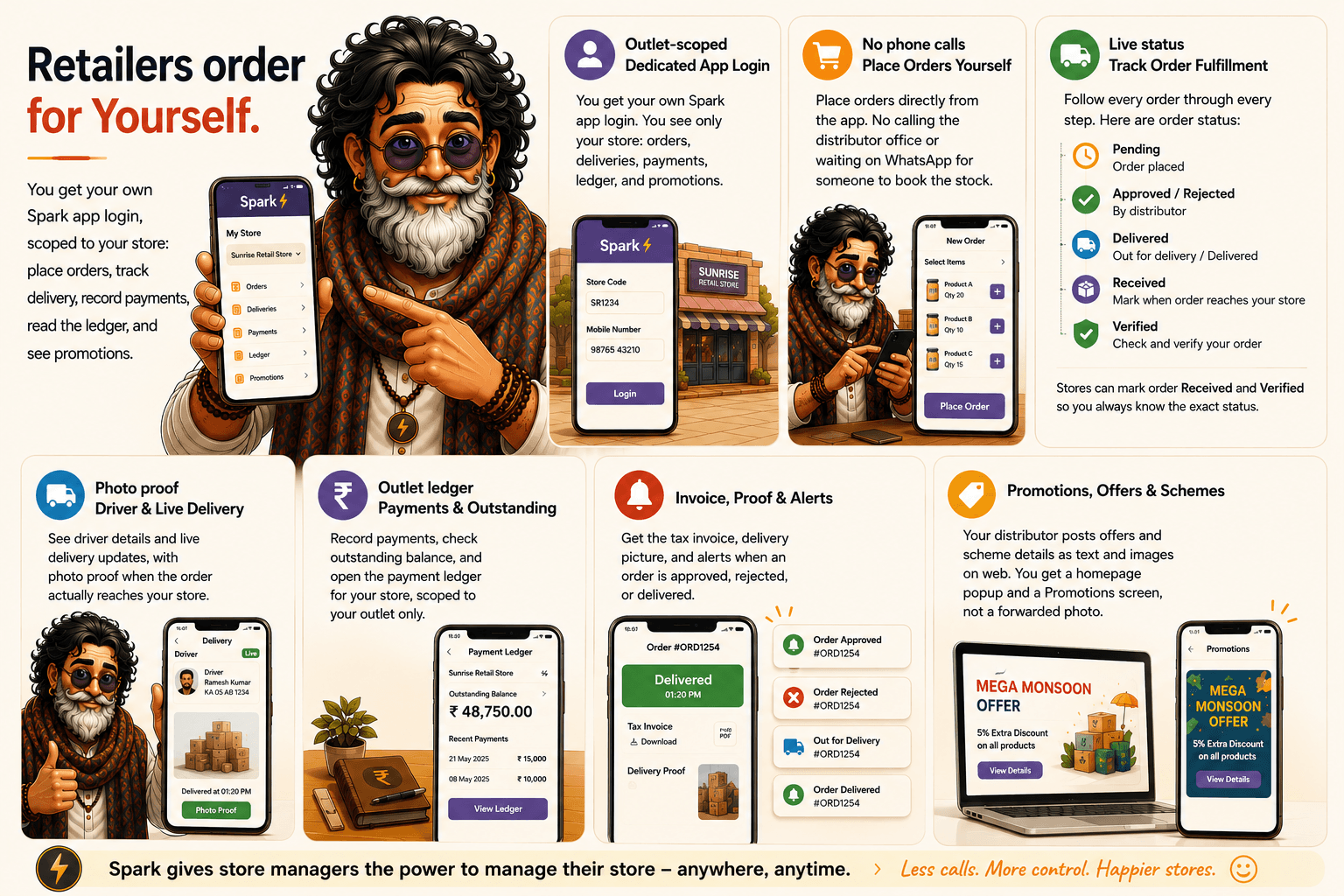
Retailers order for themselves.

Store managers assigned to an outlet get their own Spark login, scoped to that store.

Store manager Spark app overview: outlet-scoped login, self-service ordering without phone calls, live order status from pending through verified, driver and delivery photo proof, outlet payment ledger and outstanding balance, tax invoice and delivery proof with push alerts, and promotions posted from web shown in the app.
18 / FeatureNo Other Software

No other software does this.

The handful of things distributors tell us they cannot get anywhere else, from AI-verified payments and auto bank settlement to Tally automation and trip planning.

12+ checks

AI-Verified Payments

12+ checks read the cheque or screenshot and flag tampering before you bank it. Every competitor simply trusts whatever the staff types in.

5 receipts at once

Payments Created By AI

Five receipts in, every field extracted and prefilled. Competitors still require typing amount, date, UTR, and mode by hand.

PayTM · ICICI · SBI

Auto Bank Settlement

Hundreds of PayTM and bank statement rows matched to recorded payments by UTR and amount. No competitor even attempts this.

Bills Receivable

Tally Credit Report per TSE

Bills Receivable becomes one Excel per TSE with a WhatsApp summary. Everyone else splits sheets and forwards them by hand.

One PDF in

Outstanding Straight to Stores

One PDF upload becomes store-wise WhatsApp balances. Offices elsewhere forward pages one retailer at a time.

Nearest neighbour

Trip Planning for Distributors

Stops sequenced into an efficient route with Next Stop navigation and auto trip reports. No competitor touches trip planning for distributors.

FAQ

Run your distribution on proof, not phone calls

Questions, a demo, or partnerships. Reach us on email or WhatsApp and a human replies.

Free to start · No payment required · Web + Android